

IR Seeker Video Lesson #2
QikEasy IR Seeker now fully supports Word Block for Spike 2 & 3, Python for Spike 2 & 3, and Python for Pybricks on Spike Prime.
This video is the second part of the tutorials on how to use QikEasy IR Seeker.
Here’s the Word Block program for the first part of the tutorial (for Spike App 3):
<< For Spike App 2, remember to change the reduction factor value from 4 to 1. >>
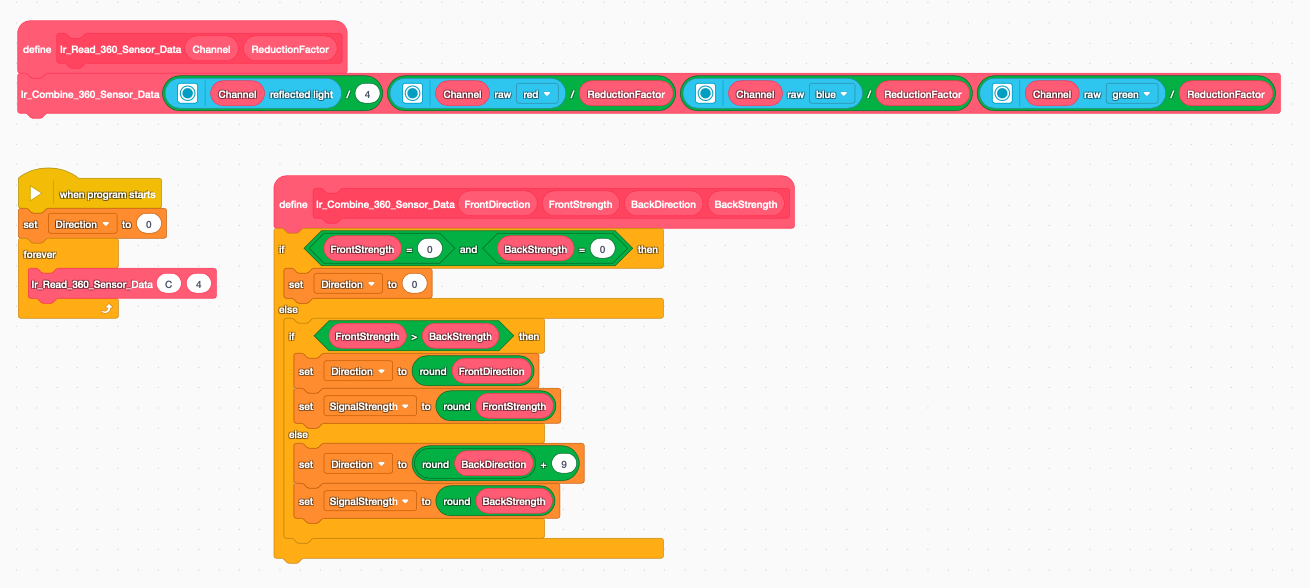
Here’s the Python code for part 1 of the tutorial (for Spike App 3):
<< For Spike App 2, remember to change the reduction factor value from 4 to 1. >>
from hub import light_matrix, port
import runloop
import color_sensor

Direction = 0
SignalStrength = 0

# IR Seeker Combine IR Data Function into the two global variables
def Ir_Combine_360_Sensor_Data(FrontDirection, FrontStrength, BackDirection, BackStrength):
    global Direction, SignalStrength
    if ( FrontStrength == 0 and BackStrength == 0):
        Direction = 0
    else:
        if ( FrontStrength > BackStrength):
            Direction = round( FrontDirection )
            SignalStrength = round( FrontStrength )
        else:
            Direction = round( BackDirection ) + 9
            SignalStrength = round( BackStrength )

# IR Seeker Read 360 Function
def Ir_Read_360_Sensor_Data(Channel, ReductionFactor):
    rgb = color_sensor.rgbi(Channel)
    Ir_Combine_360_Sensor_Data( color_sensor.reflection(Channel)//4, rgb[0]//ReductionFactor, rgb[2]//ReductionFactor, rgb[1]//ReductionFactor)

# MAIN PROGRAM
async def main():
    while (1):
        Ir_Read_360_Sensor_Data(port.C, 4)
        print( [Direction, SignalStrength] )
        await runloop.sleep_ms(200)

runloop.run(main())
Here’s the Pybricks’ Python code for part 1 of the tutorial (for Pybricks Python on Spike Prime):
from pybricks.hubs import PrimeHub
from pybricks.iodevices import PUPDevice
from pybricks.parameters import Port
from pybricks.tools import wait
# Initialize the Hub and open the sensor as a generic Powered Up Device
hub = PrimeHub()
sensor_device = PUPDevice(Port.C)
# Mode constants for the LEGO Color Sensor
MODE_REFLECTION_RAW = 1
MODE_RGB_RAW = 5
# Global variables to store the combined tracking data
Direction = 0
SignalStrength = 0
def Ir_Combine_360_Sensor_Data(FrontDirection, FrontStrength, BackDirection, BackStrength):
    global Direction, SignalStrength

    if FrontStrength == 0 and BackStrength == 0:
        Direction = 0
    else:
        if FrontStrength > BackStrength:
            Direction = round(FrontDirection)
            SignalStrength = round(FrontStrength)
        else:
            Direction = round(BackDirection) + 9
            SignalStrength = round(BackStrength)
def Ir_Read_360_Sensor_Data(device, ReductionFactor):
    # 1. Switch to Mode 1 to get raw reflection data
    # Returns a tuple; we take the first element
    raw_reflection_tuple = device.read(MODE_REFLECTION_RAW)
    front_dir = raw_reflection_tuple[0] // 4

    # 2. Switch to Mode 5 to get raw unscaled RGBI data
    # Returns a tuple of 4 items: (Red, Green, Blue, Intensity)
    r, g, b, _ = device.read(MODE_RGB_RAW)

    # Map raw light values to match your algorithm logic
    front_strength = r // ReductionFactor   # Using red channel analogue
    back_direction = b // ReductionFactor   # Using blue channel analogue
    back_strength = g // ReductionFactor    # Using green channel analogue

    # Process combined data
    Ir_Combine_360_Sensor_Data(front_dir, front_strength, back_direction, back_strength)
# MAIN PROGRAM LOOP
while True:
    # Pass the raw PUPDevice object and reduction factor
    Ir_Read_360_Sensor_Data(sensor_device, 4)
    print([Direction, SignalStrength])

    # Wait for 200 milliseconds
    wait(200)
Here’s the Word Block program for the second part of the tutorial (for Spike App 3):
<< For Spike App 2, remember to change the reduction factor value from 4 to 1. >>
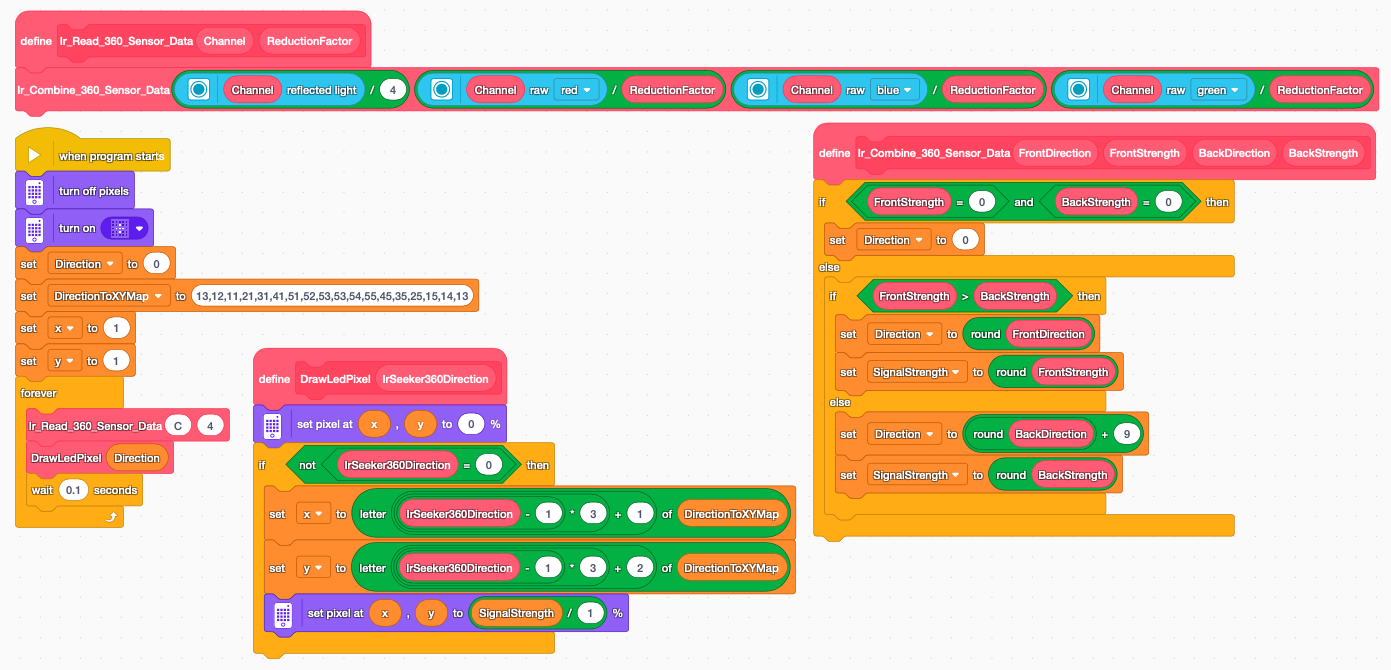
Here’s the Python code for part 2 of the tutorial (for Spike App 3):
<< For Spike App 2, remember to change the reduction factor value from 4 to 1. >>
from hub import light_matrix, port
import runloop
import color_sensor

Direction = 0
SignalStrength = 0
DirectionToXYMap = "13,12,11,21,31,41,51,52,53,53,54,55,45,35,25,15,14,13"
x = 1
y = 1

# IR Seeker Combine IR Data Function into the two global variables
def Ir_Combine_360_Sensor_Data(FrontDirection, FrontStrength, BackDirection, BackStrength):
    global Direction, SignalStrength
    if ( FrontStrength == 0 and BackStrength == 0):
        Direction = 0
    else:
        if ( FrontStrength > BackStrength):
            Direction = round( FrontDirection )
            SignalStrength = round( FrontStrength )
        else:
            Direction = round( BackDirection ) + 9
            SignalStrength = round( BackStrength )

# IR Seeker Read 360 Function
def Ir_Read_360_Sensor_Data(Channel, ReductionFactor):
    rgb = color_sensor.rgbi(Channel)
    Ir_Combine_360_Sensor_Data( color_sensor.reflection(Channel)//4, rgb[0]//ReductionFactor, rgb[2]//ReductionFactor, rgb[1]//ReductionFactor)
    print(Direction)

# Draw Pixel on LED Matrix to indicate direction
def Draw_Led_Pixel( IrSeeker360Direction ):
    global x, y
    light_matrix.set_pixel( x-1, y-1, 0)
    if ( IrSeeker360Direction != 0 ):
        x = int( DirectionToXYMap[ (IrSeeker360Direction - 1) * 3 ] )
        y = int( DirectionToXYMap[ (IrSeeker360Direction - 1) * 3 + 1 ] )
        light_matrix.set_pixel( x-1, y-1, 100)

# MAIN PROGRAM
async def main():
    light_matrix.clear()
    # Draw the cross at the center of the display
    light_matrix.show([  0,  0,  0,  0,  0] +
                      [  0,  0,100,  0,  0] +
                      [  0,100,100,100,  0] +
                      [  0,  0,100,  0,  0] +
                      [  0,  0,  0,  0,  0])
    while (1):
        Ir_Read_360_Sensor_Data(port.C, 4)
        Draw_Led_Pixel(Direction)
        await runloop.sleep_ms(200)

runloop.run(main())
Here’s the Pybricks’ Python code for part 2 of the tutorial (for Pybricks Python on Spike Prime):
from pybricks.hubs import PrimeHub
from pybricks.iodevices import PUPDevice
from pybricks.parameters import Port
from pybricks.tools import wait
# Initialize the Hub and the raw device on Port C
hub = PrimeHub()
sensor_device = PUPDevice(Port.C)
# Mode constants for the LEGO Color Sensor
MODE_REFLECTION_RAW = 1
MODE_RGB_RAW = 5
# Global variables
Direction = 0
SignalStrength = 0
DirectionToXYMap = “13,12,11,21,31,41,51,52,53,53,54,55,45,35,25,15,14,13”
x = 1
y = 1
def Ir_Combine_360_Sensor_Data(FrontDirection, FrontStrength, BackDirection, BackStrength):
    global Direction, SignalStrength

    if FrontStrength == 0 and BackStrength == 0:
        Direction = 0
    else:
        if FrontStrength > BackStrength:
            Direction = round(FrontDirection)
            SignalStrength = round(FrontStrength)
        else:
            Direction = round(BackDirection) + 9
            SignalStrength = round(BackStrength)
def Ir_Read_360_Sensor_Data(device, ReductionFactor):
    # 1. Read Mode 1 (Raw reflection)
    raw_reflection_tuple = device.read(MODE_REFLECTION_RAW)
    front_dir = raw_reflection_tuple[0] // 4

    # 2. Read Mode 5 (Raw RGB)
    r, g, b, _ = device.read(MODE_RGB_RAW)

    front_strength = r // ReductionFactor
    back_direction = b // ReductionFactor
    back_strength = g // ReductionFactor

    Ir_Combine_360_Sensor_Data(front_dir, front_strength, back_direction, back_strength)
    print(Direction)
# Draw Pixel on LED Matrix to indicate direction
def Draw_Led_Pixel(IrSeeker360Direction):
    global x, y

    # Turn off the old pixel location
    # Pybricks pixel grid is 0-4 for columns and 0-4 for rows
    hub.display.pixel(y – 1, x – 1, 0)

    if IrSeeker360Direction != 0:
        # Extra lookup math matching your string dictionary parsing
        x = int(DirectionToXYMap[(IrSeeker360Direction – 1) * 3])
        y = int(DirectionToXYMap[(IrSeeker360Direction – 1) * 3 + 1])

        # Light up the new pixel at full brightness (100)
        hub.display.pixel(y – 1, x – 1, 100)
# MAIN PROGRAM SETUP
# In Pybricks, we create a 5×5 list for custom static grids
center_cross = [
    [  0,  0,  0,  0,  0],
    [  0,  0,100,  0,  0],
    [  0,100,100,100,  0],
    [  0,  0,100,  0,  0],
    [  0,  0,  0,  0,  0]
]
# Clear matrix screen and apply our layout base icon
hub.display.icon(center_cross)
# MAIN PROGRAM LOOP
while True:
    Ir_Read_360_Sensor_Data(sensor_device, 4)
    Draw_Led_Pixel(Direction)
    wait(50)